Field Rep CRM

Your reps log a visit in about a minute. DepletionIQ puts it on the account, schedules the next step, and measures what the visit actually moved — using the distributor's numbers, not the rep's.

What a rep fills out after a visit.

One form, on a phone, in the parking lot. This is the actual form in DepletionIQ, filled in for a completed tasting — example account, real fields.

demo.depletioniq.io / events / new Scroll inside to see the whole form
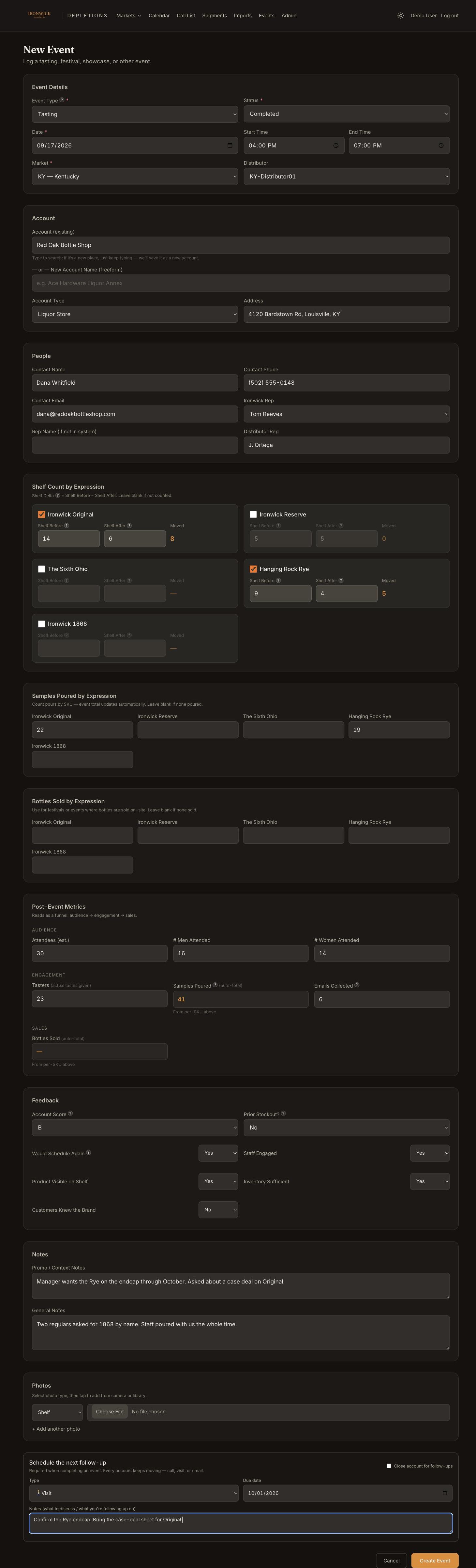
DepletionIQ visit log form filled in for a completed tasting at Red Oak Bottle Shop: event details, account, people, shelf count by expression, samples poured, post-event metrics, feedback, notes, photos, and the required next follow-up

Why those fields, and not a free-text box.

Every line on the form exists because it answers a question ownership asks later. Nothing is there for the sake of thoroughness.

Shelf before and after

Before minus after is the one honest count of what a tasting sold on the day. It doesn't depend on anyone's memory or the register.

The stockout flag

If the shelf was empty before the rep showed up, the jump afterward isn't lift — it's restocking. Flagging it keeps the analysis honest.

The account score

The rep's own A–D read on the account. Kept so it can be compared, months later, with what the depletion numbers say.

Who was there

Your rep and the distributor's rep are both on the record, so credit, cost and follow-through attach to the right people.

The required next step

A visit can't be marked complete without a call, visit or email on the calendar — or a deliberate decision to close the account. No dead ends.

How a visit gets back to the account.

This is the part a normal CRM can't do, because a normal CRM never sees the distributor's depletion report.

  1. 1

    The visit lands on the account.

    The event sits on the account's page beside its monthly depletion history, SKU mix and last order months. Ownership sees what the rep did and what the distributor shipped in one view.

  2. 2

    The follow-up becomes the rep's to-do.

    Each rep's home screen sorts follow-ups into overdue, this week and upcoming, with a streak for keeping them current. Completing one schedules the next, so the chain on an account never breaks.

  3. 3

    Lift is measured with the distributor's numbers.

    Thirty, sixty and ninety days after a tasting, DepletionIQ compares the account's depletions to its run rate before the visit and reports the lift — per tasting, per rep, per market. The rep doesn't grade their own work.

  4. 4

    The call list decides where to go next.

    Accounts that have lapsed or slipped off their reorder cadence rise to the top; accounts tasted in the last ninety days drop back while their lift is still loading. Reps get a ranked list, not a map and a hunch.

  5. 5

    The market scorecard turns it into money.

    Bottles moved against the rep's monthly cost, break-even, and placement bounties for new accounts — by market, by month. The question "is this rep paying for themselves?" gets a number.

Reps see their accounts. The office sees everything.

Two kinds of seat, priced that way.

Field reps

Their assigned accounts, their visits, their follow-ups and the call list for their market — on a phone, with nothing else in the way. Signal includes 9, Command includes 20, and every state added beyond 10 brings 2 more.

Users

The full dashboard: every market, every account, every rep's activity, the lift results and the scorecards. Signal includes 3, Command 5, Managed as many as you need.

Put the whole team in it for less than one seat elsewhere.

Send us one month of distributor reports. We'll return a live DepletionIQ view of your business in seven days — reps included, nothing to install.